Desktop Speakers That Actually Sound Good
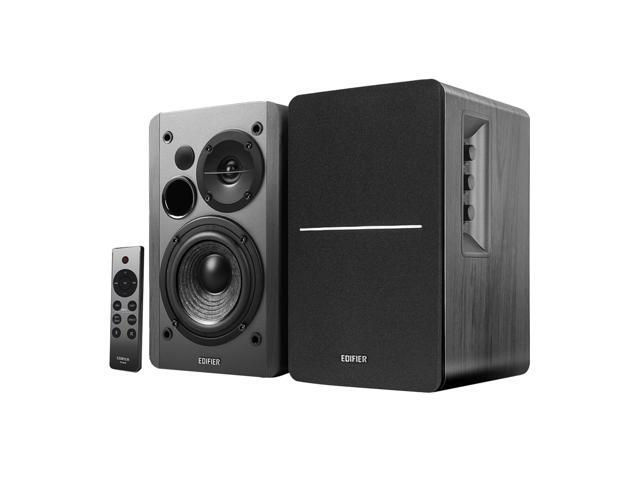
Most people listen to music, podcasts, and game audio through their laptop speakers or a cheap Bluetooth pill. The justification is usually “I don’t have space for real speakers” or “I don’t want a complicated setup.” The Edifier R1280DBs removes both excuses. Two small boxes, one cable between them, and whatever source cable you need. That’s the whole setup.
I’ve had the R1280DBs on my desk for four months. They replaced a pair of studio monitors that cost four times as much. Not because they sound better. Because they’re better at being desk speakers.
Sound Quality
The 4-inch bass driver and 13mm silk dome tweeter in each speaker punch above what the size suggests. The midrange is where these speakers live, and it’s a good place to live. Vocals sound present and natural. Acoustic instruments have body. Podcast voices fill the room without that hollow, tinny quality that plagues smaller speakers.
Bass: The R1280DBs reach down to 52 Hz, which covers most music convincingly. Kick drums have weight. Bass guitars are defined. But sub-bass below 50 Hz just isn’t there. Electronic music with deep 808s and action movies with rumbling explosions will sound incomplete. This is physics, not a flaw. A 4-inch driver in an enclosure this small can’t move enough air for true sub-bass. That’s what the sub-out port is for, but more on that later.
Mids: This is where cheap speakers usually fall apart, and where the R1280DBs hold firm. I compared them against my Beyerdynamic DT 770 Pro X headphones during a few mixing sessions. The midrange character is different (speakers always sound different from headphones) but the tonal balance was in the same neighborhood. Vocals didn’t sound recessed or honky. Guitars had appropriate bite without harshness.
Treble: The 13mm silk dome tweeter is detailed without being aggressive. Hi-hats shimmer, cymbal taps have the right metallic quality, and sibilance in vocals is controlled. At moderate listening levels (where desk speakers spend most of their life), the treble is balanced and pleasant. Push the volume past 75% and some brightness creeps in on tracks that are already harsh. For normal desk listening, you won’t touch the treble dial.
The side-panel EQ dials for bass and treble are analog and tactile. No app, no software, no profiles to manage. Turn the bass knob up if your desk absorbs low end. Roll the treble back if your room is reflective. Simple adjustments that make a real difference when you’re sitting three feet from the speakers.
Connectivity
Four inputs is absurd for speakers at this level, and I mean that as a compliment.
Bluetooth 5.0 with Qualcomm aptX handles wireless streaming from my phone and laptop with no perceptible lag for music. For video, there’s a slight delay that makes lip-sync noticeable in dialog-heavy content. Switching to a wired connection eliminates this entirely.
Optical (TOSLINK) is what I use daily, running from my PC motherboard’s optical out. The signal is clean with no ground loop hum, which is a problem that plagues USB and analog connections from computers. If your PC has an optical output, use it.
Coaxial is there for older receivers or DACs that output coaxial digital. I tested it with an older CD player. Clean signal, no issues.
Dual RCA handles analog sources: turntables (with a preamp), older devices, or a 3.5mm-to-RCA cable from a phone or laptop. The RCA inputs picked up a faint hum when connected to my PC’s headphone jack, which is exactly why I switched to optical.
Source switching happens via the wireless remote. Press the input button and it cycles through sources. An LED on the front panel shows which input is active. The remote also handles volume, mute, and power. After four months, I use the remote more than any other input method. Reaching behind the speaker to adjust volume with the rear knob gets old fast.
The Sub-Out Port
This is the feature that separates the R1280DBs from the standard R1280DB. The “s” stands for subwoofer output, and it matters.
Most powered speakers in this class are closed systems. You get what you get. If you want more bass, you buy different speakers. The R1280DBs has a dedicated subwoofer output on the back of the primary speaker. Connect any powered subwoofer, and the R1280DBs sends low frequencies to it while the main speakers handle mids and highs.
I tested this with a compact 8-inch powered sub for two weeks. The difference was dramatic. Sub-bass that the 4-inch drivers physically cannot produce suddenly appeared. Movie explosions had impact. Electronic bass lines had the chest-thumping presence they’re supposed to have. And because the main speakers were relieved of trying to reproduce frequencies below their comfort zone, the midrange actually cleaned up slightly.
You don’t need a sub on day one. But knowing the upgrade path exists means these speakers grow with you instead of getting replaced.
Build and Design
The wood veneer panels look more expensive than they are. The MDF enclosure is solid with no resonance or rattle at any volume I tested. Each speaker has a bass reflex port on the rear, so you’ll want at least four inches of clearance behind them against a wall. Push them flush against a wall and the bass gets boomy and undefined.
The primary (right) speaker houses all the electronics: amplifier, Bluetooth receiver, input board, and power supply. The secondary (left) speaker connects via a standard speaker wire with spring clip terminals. The included cable is adequate. If you need a longer run, any 16-gauge speaker wire works.
At 146 x 174 x 234mm per speaker, they’re compact enough for a standard desk without dominating the space. Taller than a typical Bluetooth speaker, shorter than studio monitors. They fit on desktop speaker stands or straight on the desk surface. I used foam isolation pads underneath to decouple them from the desk, which tightened the bass slightly and reduced vibration transfer.
Who Should Buy These
Anyone who works at a desk and is tired of laptop speakers or a Bluetooth puck pretending to produce stereo sound. The R1280DBs is the shortest path from bad desktop audio to good desktop audio with the least amount of setup friction.
PC gamers who want spatial audio from speakers instead of headphones for casual sessions. The stereo imaging is wide enough for positional awareness in games, though headphones like the HyperX Cloud III Wireless will always be more precise for competitive play.
Home office workers on frequent video calls who want their music and podcast playback to sound significantly better between meetings.
Skip these if you need bass that shakes the room without adding a subwoofer. Skip these if you need more than 42W of power for a large room. And skip these if you want USB audio input, because these don’t have it.
The Bottom Line
Four months of daily desk use and the Edifier R1280DBs just work. They connect to everything. They sound balanced and detailed at desk distances. The sub-out port means they can grow with you. The wireless remote means you actually control them instead of reaching behind a speaker every time you need to adjust volume.
The gap is sub-bass, and the sub-out port is the answer. The gap is power for large rooms, and that was never the job. For a desk, a bedroom, a small living room? The R1280DBs fill the space with clean, balanced sound from whatever source you connect. Four inputs. Bluetooth aptX. Analog EQ. Subwoofer output. No software required. That’s a desktop speaker system that respects your time and your ears.