The Case for a Dedicated Microphone
Your laptop mic is bad. Your webcam mic is worse. And that gaming headset mic you’ve been using for work calls? Your coworkers can tell. They’ve just been too polite to mention it.
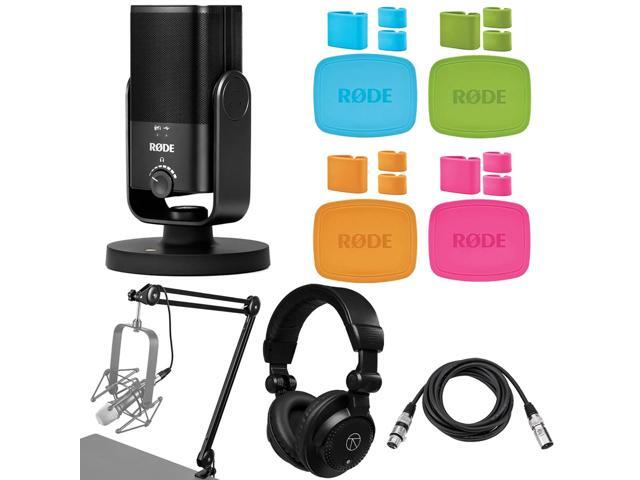
A standalone USB microphone fixes this in about 30 seconds. Plug it in, select it as your input device, done. No audio interface, no XLR cables, no phantom power switches. The Rode NT-USB Mini takes that simplicity and adds studio-grade audio quality in a package barely bigger than a soda can.
Build and Design
The NT-USB Mini is small. Genuinely small. At 140mm tall and 53mm wide, it takes up less desk space than a coffee mug. The all-metal body has a matte black finish that looks professional on camera without screaming “I’m a streamer.”
The integrated stand uses a magnetic base with a 360-degree swing mount. Tilt the mic toward your mouth, and the magnets hold it there. It’s stable enough for desk use, though a hard bump will shift the angle. For boom arm mounting, there’s a standard 3/8-inch thread on the bottom (5/8-inch adapter included).
One USB-C port on the back handles both power and audio. Rode includes a USB-C to USB-A cable in the box. If your laptop has USB-C, you’ll need your own cable, which is a minor annoyance for a product released in the USB-C era.
Audio Quality
This is where the NT-USB Mini separates itself from the sea of cheap USB microphones. The 14mm condenser capsule captures a full, warm vocal tone with enough detail to hear the difference between a good recording environment and a bad one.
I recorded voice samples in three scenarios: a treated room with acoustic panels, an untreated home office, and a kitchen with hard surfaces. In the treated room, the NT-USB Mini sounded genuinely professional. Clean, present, with natural warmth in the low mids. In the home office, it was still good, with some room reflection that the built-in DSP handled well. In the kitchen, it picked up every surface reflection and the fridge humming, because no microphone fixes bad acoustics.
The cardioid polar pattern rejects sound from the sides and rear reasonably well. Sitting 6 to 8 inches from the capsule, keyboard clicks behind the mic were barely audible in recordings. Move the mic further away or type on a loud mechanical keyboard (I tested with my Corsair K100 RGB), and those clicks start bleeding in. Positioning matters.
Frequency response runs 20 Hz to 20 kHz at 48 kHz/24-bit. That’s the same sample rate and bit depth as entry-level audio interfaces. For voice work, podcasting, and streaming, it’s more than enough. You’re not recording a symphony orchestra. You’re talking into a mic.
RODE Connect Software
This is the NT-USB Mini’s secret weapon. RODE Connect is a free desktop app that turns the mic into a virtual mixer with per-channel processing. You get:
- High-pass filter: Cuts low-frequency rumble from air conditioning, foot traffic, and desk vibrations
- Compressor/limiter: Evens out volume so you don’t blow out your listeners’ ears when you laugh or lean in
- Noise gate: Cuts audio below a threshold, silencing the mic between sentences
- Aphex processing: Aural Exciter adds high-frequency presence, Big Bottom adds low-end warmth
The compressor alone is worth installing the software. On a video call, it means your voice stays at a consistent level whether you’re leaning into the mic or reaching for your coffee. For podcast recording, it handles the basic dynamics processing that would otherwise require a plugin chain in your DAW.
The catch: RODE Connect only works with RODE USB microphones, and it caps at four mics. If you’re already using a DAW like Reaper or Logic, you might prefer your own plugin chain. But for anyone who doesn’t want to learn audio engineering just to sound good on Zoom, RODE Connect handles it.
Headphone Monitoring
The 3.5mm headphone jack on the front of the mic provides zero-latency monitoring. You hear your own voice in real time, with no delay. This matters more than people realize. Audio delay in monitoring (even 10 to 20 milliseconds) is disorienting. It makes you talk quieter, hesitate, or lose your train of thought. Zero-latency monitoring eliminates that.
The headphone output volume is controlled by a dial on the front of the mic. It drives my Sennheiser HD 560S to comfortable monitoring levels, though not much beyond that. For high-impedance headphones, you might want a separate headphone amp. For typical earbuds or low-impedance cans, it’s fine.
What’s Missing
No gain knob on the mic body. You adjust input gain through RODE Connect or your OS audio settings. This works fine at a desk, but it means you can’t make quick adjustments mid-recording without reaching for your computer.
No mute button. In 2026, for a mic marketed at streamers and remote workers, this is a real omission. I end up using my video call app’s mute shortcut instead. It works, but a hardware mute with an LED indicator would be better.
No USB-C to USB-C cable in the box. Rode, if you’re reading this: the dongle era is over.
Positioning Tips
The NT-USB Mini sounds best 6 to 8 inches from your mouth, angled slightly upward toward your chin. This position captures clear vocal tone while minimizing plosives (those harsh “P” and “B” sounds that pop in the recording).
On the desk stand, this means the mic sits just below and in front of your monitor. Works perfectly if your desk is the right height. If you’re tall or your desk is low, a short boom arm helps. The built-in pop filter handles light plosives, but a foam windscreen improves things further for recording sessions.
For video calls, the desk stand position is fine as-is. Your voice will sound dramatically better than any built-in mic, even without perfect positioning.
Compared to the Competition
The Blue Yeti has been the default USB mic recommendation for a decade. The NT-USB Mini beats it in three ways: it’s smaller, it sounds more natural (the Yeti has a hyped midrange that makes voices sound slightly nasal), and RODE Connect’s DSP is more useful than Blue’s VO!CE software.
The Elgato Wave:3 is the closest competitor. It matches the NT-USB Mini on audio quality and adds a gain knob and mute button on the mic body. The Wave:3 is bigger, heavier, and uses Elgato’s Wave Link software instead of RODE Connect. If the missing mute button and gain knob bother you, the Wave:3 solves both. If desk space and simplicity matter more, the NT-USB Mini wins.
Who Should Buy This
Three groups. Remote workers who want to sound professional on video calls without a complicated setup. Podcasters and content creators who need clean voice recording without an audio interface. And gamers who want better voice chat quality without strapping a headset to their face.
Skip this if you already own an audio interface and an XLR mic. Skip it if you need multiple polar patterns for recording instruments or room audio. And skip it if you absolutely need a hardware mute button.
The Bottom Line
Eight months in, the Rode NT-USB Mini sits on my desk, ready for every call, every recording, every stream. The audio quality made my coworkers ask if I got a new mic (I did, eight months ago, they just finally noticed). The DSP handles the processing I used to do manually. And the whole thing takes up less space than my phone stand.
The missing mute button and gain knob are genuine drawbacks, not dealbreakers. For the size, the sound quality, and the simplicity of plugging in one USB cable and sounding good, the NT-USB Mini does exactly what a USB microphone should do: make your voice sound like you, only better.