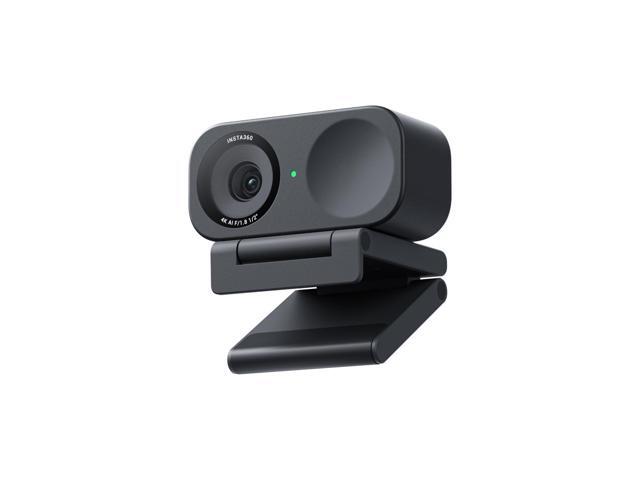
The Webcam That Physically Follows You
Every webcam with “AI tracking” uses the same trick: start with a wide-angle shot, then digitally crop to follow your face. You get tracking, but you lose resolution. The tighter the crop, the softer the image. It works, but it’s a compromise.
The Insta360 Link 2 takes a different approach. It puts the camera on a 2-axis gimbal that physically pans and tilts to follow you. The lens moves. The full sensor stays active. When the camera tracks you across your desk, you’re still getting a full 4K image from the entire sensor, not a cropped slice of a wider shot.
I’ve been using the Link 2 for four months. Video calls, presentations, product demos, and some content recording. Here’s whether the gimbal justifies the premium over a standard webcam.
Image Quality
At 4K/30fps, the Link 2 produces a sharp, detailed image that’s a clear step up from the 1080p webcams I’ve been comparing it against. The 1/2-inch sensor captures more light per pixel than the smaller sensors in the Logitech Brio 500 and Elgato Facecam MK.2. Skin texture is visible without looking harsh. Fabric patterns are legible. The background has enough detail that your bookshelf actually looks like individual books, not a smeared backdrop.
Colors lean slightly warm out of the box. Skin tones look healthy, maybe a touch too healthy. The Insta360 Link Controller app lets you dial in white balance and saturation manually, and I nudged the warmth down about 10% to get a more neutral look. Once set, the settings persist.
Phase detection autofocus is fast and accurate. It locks on in a fraction of a second and doesn’t hunt. I tested it by leaning forward, leaning back, holding objects at various distances. Every time, the focus snapped to the right distance without the searching and re-searching you get from contrast-detect systems. During four months of daily use, I never had a single focus hunt during a live call.
Drop to 1080p and you get 60fps, which is the better mode for streaming. The image is still sharp, and the extra frames make motion look noticeably smoother. For video calls, 4K/30fps is the better choice since most call platforms compress the feed anyway.
The Gimbal: What Makes This Different
The 2-axis gimbal is the entire reason the Link 2 exists, and it works. Pan range covers 170 degrees. Tilt goes from pointing at the ceiling to pointing straight down at your desk. The motors are smooth, the tracking is responsive, and the camera follows your face without jerking or overshooting.
Stand up to grab something? The camera tilts up to follow. Lean over to your second monitor? It pans smoothly. Walk across the room during a presentation? It tracks you the entire way until you leave its field of view. All of this happens with no resolution penalty because the lens is physically moving, not a crop box.
The tracking offers multiple modes. Face tracking keeps you centered and is the default. Upper body mode shows your head and torso, good for presentations where you gesture with your hands. Whiteboard mode detects a whiteboard behind you and frames it while keeping you in the corner of the frame. Desk view tilts the camera downward to capture your workspace from above.
I use desk view more than I expected. Product demos, drawing on paper, showing hardware up close. Tilting the gimbal straight down turns the Link 2 into an overhead camera without any arm or mount. It’s not a replacement for a proper overhead rig, but for spontaneous “let me show you this” moments in a call, it’s perfect.
The downsides: the gimbal motors make noise. A quiet whir when the camera pans or tilts. In a normal room with ambient noise, you won’t hear it. In a silent room with a sensitive condenser microphone sitting next to the camera, you might. I moved my mic about 18 inches further from the Link 2 and the noise disappeared from my audio.
The other issue: weight. The camera is 127 grams and the stand adds 87 grams. That’s 214 grams total, over twice the weight of the Elgato Facecam MK.2. The integrated stand sits on top of your monitor rather than clipping to it, which distributes the weight better, but thin-bezel monitors may tilt slightly. My 27-inch monitor handles it fine. A thin laptop lid would struggle.
Low-Light Performance
The f/1.8 aperture is wider than the f/2.0 on the Facecam MK.2, which means the Link 2’s sensor receives about 23% more light per frame. In practice, that gap is visible.
My home office has a single window that provides decent light during the day and nothing at night. After sunset, with just my monitor and a dim desk lamp, the Link 2 produced a clean, usable image. Grain was present but controlled. Colors stayed accurate. The face tracking still worked without issues because the sensor had enough signal to detect my face reliably.
HDR mode helps in mixed-lighting scenarios. Bright window behind you while you face a dim room? HDR balances both. It works at 4K/30fps, which is a nice touch since some competitors drop to lower resolution for HDR. The dynamic range isn’t as wide as what you’d get from a proper mirrorless camera, but for a webcam dealing with a backlit desk setup, it handles the situation well.
In near-darkness (monitor off, just ambient light from another room), the image degrades. Noise increases, colors shift, and the autofocus slows down. But that’s a scenario no webcam handles well. For realistic low-light conditions where you have at least one light source, the Link 2 outperforms both 1080p webcams I’ve been comparing it against.
Gesture Controls
Gesture controls sounded gimmicky on paper. After four months, I use them daily.
Hold your palm up facing the camera, and it zooms in. Make a rectangle with your index fingers and thumbs, and the camera switches to whiteboard mode. Hold up an L shape to enter portrait mode. Swipe left to switch back to the previous mode.
The recognition is reliable if you hold the gesture for about a second and you’re within the camera’s field of view. I’d estimate 90% accuracy in good lighting, dropping to around 75% in dim conditions. False positives are rare. I never accidentally triggered a mode change during normal gesturing in a conversation.
The practical value: you can switch camera modes without touching your keyboard or clicking through software. Mid-presentation, you hold up your palm, the camera zooms in on you. You make the rectangle gesture, it frames your whiteboard. No alt-tabbing to an app, no asking someone to wait while you adjust settings. For presenters and teachers, this is genuinely useful.
Microphone Quality
The Link 2 includes dual noise-canceling microphones. They’re good enough for video calls. Voice comes through clearly, background noise gets reduced, and call participants won’t have complaints.
For streaming or recording, they’re not sufficient. The noise cancellation is aggressive enough to occasionally clip consonants. Room echo bleeds through. And the gimbal motor noise, while quiet, is detectable by the onboard mics when the camera is actively tracking.
If you stream or record content, pair this with a dedicated microphone. For video calls, the built-in mics work fine.
Software and Setup
The Insta360 Link Controller app handles all settings: tracking mode, image adjustments, gesture toggle, firmware updates. The interface is clean and responsive. Settings save to the camera’s onboard memory, so your preferences follow the Link 2 between machines.
Setup is straightforward. Plug in USB-C, install the app, update firmware if prompted, and you’re live. The camera appears as a standard UVC device, so it works immediately in Zoom, Teams, OBS, and every other video application I tested without any driver installation.
One annoyance: the app occasionally fails to detect the camera on first launch and requires a restart. It happens maybe once every two weeks. Minor, but worth noting.
Link 2 vs the Competition
Against the Elgato Facecam MK.2: the MK.2 has superior uncompressed 1080p output at 60fps and no gimbal noise. If you sit in one spot and want the cleanest possible 1080p feed for streaming, the MK.2 wins. The Link 2 wins on resolution (4K), low-light performance (wider aperture), and versatility (gimbal tracking, gesture controls, overhead mode). Different tools for different jobs.
Against the Logitech Brio 500: the Brio 500 is simpler, lighter, and clips to any monitor without issues. Its auto-framing uses digital crop, which costs resolution but adds no mechanical noise. The Link 2 beats it on image quality, tracking precision, and features, but the Brio 500 is the easier device to live with if you don’t need the extras.
The Link 2 is the best choice if you move during calls, present to groups, demo products, or want 4K image quality with AI tracking that doesn’t sacrifice resolution.
Who Should Buy This
Presenters and educators who move while they talk. The gimbal tracks you physically, keeping full resolution, without the soft digital crop of competing webcams.
Content creators who need versatility. One device does face-cam tracking, overhead desk shots, whiteboard framing, and gesture-controlled mode switching.
Remote workers who take frequent video calls in variable lighting. The f/1.8 aperture and 4K sensor handle dim rooms better than any 1080p webcam.
Skip this if you sit still at your desk and want the simplest possible webcam. The gimbal adds weight, noise, and complexity that you’ll never use. A standard 1080p webcam like the Brio 500 or Facecam MK.2 will serve you better.
The Bottom Line
The Insta360 Link 2 is the first webcam where “AI tracking” isn’t a marketing term for digital crop. The physical gimbal follows your movement while keeping the full 4K sensor active, which means tracking doesn’t cost you resolution. Four months of daily use confirmed that the gimbal is reliable, the image quality is the best I’ve seen from a webcam, and the gesture controls solve a real workflow problem.
The trade-offs are real: gimbal noise, extra weight, and 30fps at 4K. But for anyone who moves during calls, presents to audiences, or needs a versatile camera that does more than point straight ahead, the Link 2 delivers capabilities that no other webcam matches. It does what others fake.