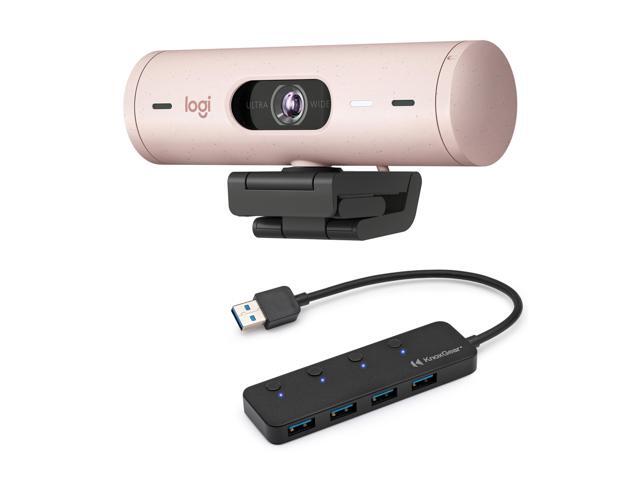
Why Your Laptop Webcam Isn’t Cutting It
That 720p webcam built into your laptop lid sits below your eye line, shoots up your nostrils, and turns you into a grainy shadow the moment the overhead light shifts. You know this. Everyone on your video calls knows this. A dedicated external webcam fixes all of it: better sensor, better angle, better light handling.
The Logitech Brio 500 is Logitech’s pitch for people who want a meaningful upgrade without stepping into the 4K prosumer territory of the Brio 4K. I’ve had one clipped to my monitor for four months. Here’s what that looks like in practice.
Image Quality
At 1080p/30fps, the Brio 500 produces a clean, natural image. Colors are accurate without the oversaturated look some webcams apply to make you “pop.” Skin tones look like skin tones. The autofocus is fast and reliable. It locks on in about half a second and doesn’t hunt unless you make sudden large movements.
The 4-megapixel sensor pulls in enough light to keep noise under control in normal room lighting. In a well-lit room, the image is crisp with good detail in hair and fabric textures. It’s the kind of quality where you look like a real person on a video call, not a smeared watercolor painting.
Where it falls short: 30fps at 1080p. Motion looks fine for talking-head video calls, but if you move your hands a lot or show physical products on camera, the lack of 60fps at full resolution is visible. You can drop to 720p for 60fps, but that defeats the purpose of upgrading.
RightLight 4 and Low-Light Performance
This is where Logitech earns its reputation. RightLight 4 is their auto-exposure and light correction system, and it handles difficult lighting better than any webcam I’ve tested in this class.
My desk faces a window. Every other webcam I’ve used either blows out the background and turns me into a silhouette, or crushes the exposure so low that the whole image looks muddy. The Brio 500 balances both. I’m properly exposed, the window behind me is bright but not nuclear, and the overall image looks natural.
In low light, the sensor pulls up brightness without introducing excessive grain. Late-night calls with just my monitor as a light source looked surprisingly watchable. Not great, but watchable. Dedicated ring lights or desk lamps still help, but the Brio 500 handles the “forgot to turn on the light” scenario better than expected.
Show Mode and Auto-Framing
Show Mode is Logitech’s auto-framing feature. It uses the full width of the sensor to detect your face and digitally crops to keep you centered in the frame. Lean left, lean right, stand up slightly. The frame follows you smoothly.
I was skeptical. Digital crop usually means noticeable quality loss. But at 4MP cropping to 1080p output, there’s enough resolution headroom that the crop doesn’t look soft. The tracking is smooth and doesn’t jitter. It’s genuinely useful if you move around while talking, or if you share your desk setup and don’t want to manually reframe.
You can also manually set the field of view to 90, 78, or 65 degrees through Logi Tune. The narrower settings are good for small rooms where you don’t want your entire background visible.
Microphone Quality
The dual noise-canceling microphones are fine for video calls. Your voice comes through clearly, background noise gets suppressed reasonably well, and nobody will complain about audio quality in a meeting.
For streaming or recording? Not good enough. The mics pick up keyboard clicks, room echo, and ambient noise that a dedicated microphone or headset would reject. If you’re streaming, pair this with a standalone mic. For calls with coworkers, the built-in mics do the job.
Build and Mount
The Brio 500 is compact and light at 121 grams. The clip mount grips monitors securely and has a standard tripod thread on the bottom. The USB-C cable is attached (not detachable), which is my one physical design complaint. If the cable fails, the whole unit is done.
The privacy shutter is a simple slide mechanism on top. Physical, mechanical, no ambiguity about whether your camera is actually off. After years of sticking tape over laptop webcams, having a real shutter built in feels like table stakes. Every webcam should have this.
Build quality is solid plastic. It doesn’t feel fragile, but it also doesn’t feel premium. The matte finish resists fingerprints. The Logitech logo on the front glows subtly when the camera is active, which is a nice touch for confirming the camera is on.
Logi Tune Software
You need Logi Tune to access field-of-view settings, Show Mode, image adjustments (brightness, contrast, saturation, sharpness), and firmware updates. The app works on Windows and macOS.
It’s fine. Not great. Settings occasionally reset after a system update. The interface is clean but slow to launch. Once you dial in your preferences, you rarely need to open it again, which is the best thing I can say about webcam software.
Who Should Buy This
The Brio 500 fits three use cases well. Remote workers who spend hours in video calls and want to look professional without fiddling with settings. Content creators who need a reliable B-camera or face cam that handles variable lighting. And anyone replacing a built-in laptop webcam who wants a genuine, visible upgrade.
If you need 4K for cropping flexibility in post-production, or 60fps at full resolution for smooth motion, look higher up the Logitech lineup or at competitors. If you stream seriously, budget for a dedicated microphone alongside this.
The Bottom Line
Four months of daily use and the Brio 500 is still clipped to my monitor. I never think about it. It turns on, finds my face, adjusts to whatever lighting my office throws at it, and makes me look like a human being on video calls. That’s what a good webcam should do.
The 1080p ceiling is the only real limitation, and it only matters if you’re comparing spec sheets. In actual use, on actual calls, 1080p with good light correction and auto-framing looks better than a noisy 4K feed from a cheaper sensor. The Brio 500 gets the fundamentals right, and the fundamentals are what matter when your face is on screen eight hours a day.