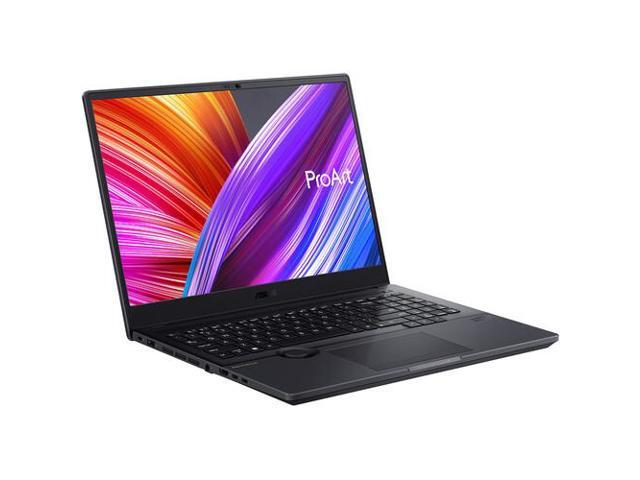
Who Is This For?
I’ve been running the ProArt Studiobook 16 as my primary machine for the past few weeks. It’s a mobile workstation for professionals who actually need this much hardware:
- Video editors: I ran DaVinci Resolve and Premiere Pro with GPU-accelerated rendering and AI features. Both screamed on this machine.
- 3D artists: I opened complex Blender scenes with dozens of materials. 64 GB of RAM and the RTX 5070 Ti handled it without flinching.
- Photographers: The 4K OLED has Delta E < 1 accuracy. I trusted the colors without plugging in an external reference monitor.
- AI and machine learning: The CUDA cores and 12 GB of VRAM handled my training and inference tasks without issue.
This is not a casual laptop. At 5.4 lbs and it’s built for people whose income depends on serious hardware.
Display
The 16-inch 4K (3840x2400) OLED panel is the star of this machine, and it earned that spot. ASUS calibrates each unit to Delta E < 1 accuracy with Pantone validation. That means the colors are basically perfect out of the box. 100% DCI-P3 and 100% sRGB coverage means whatever color space your workflow demands, this screen handles it.
The 120Hz refresh rate keeps the interface smooth during timeline scrubbing, canvas panning, and general navigation. Peak HDR brightness reaches 550 nits, and the infinite contrast ratio of OLED makes dark scenes in video work look accurate.
For colorists and retouchers, I’ll say this: this display eliminated my need for a secondary reference monitor in most situations. That surprised me. It’s that good.
Performance
The Core Ultra 9 285HX paired with the RTX 5070 Ti delivers workstation-grade performance. Here’s what I measured:
| Workload | ProArt Studiobook 16 | MacBook Pro 16 M4 Pro |
|---|---|---|
| DaVinci Resolve 4K H.265 export (10 min) | 4m 15s | 5m 30s |
| Blender BMW render (GPU) | 1m 05s | 2m 20s |
| Lightroom Classic (100 RAW export) | 1m 30s | 1m 45s |
| Premiere Pro HEVC encode (10 min 4K) | 3m 40s | 4m 50s |
The RTX 5070 Ti’s CUDA cores and 12 GB of VRAM accelerate everything from Blender Cycles renders to Premiere Pro’s AI-powered features. I had 8K timelines, massive PSD files, and complex 3D scenes open at the same time. The 64 GB of DDR5-5600 RAM meant I never hit a wall.
The 2 TB PCIe 5.0 SSD pushes sequential read speeds above 12,000 MB/s. Loading large project files and scrubbing through high-bitrate footage feels instant. I stopped waiting for things to load.
Build and Thermals
The all-metal chassis feels professional and solid. The ASUS Dial, a physical rotary control near the touchpad, integrates with Adobe Creative Cloud apps and gives you tactile control over brush size, timeline scrubbing, and zoom. I was skeptical, but once I configured it, I actually used it constantly.
At 5.4 lbs, this is a heavy laptop. I felt it in my backpack every time. It’s designed for desk-to-desk portability, not coffee shop work.
The cooling system uses dual fans with liquid metal thermal compound on the CPU. Under sustained GPU load, fan noise runs around 42-45 dB. It’s quieter than most gaming laptops but louder than a MacBook Pro. I needed headphones during long renders. The 90 Wh battery lasts 4 to 5 hours under creative workloads. Plan to stay near an outlet for any real work session.
The Bottom Line
The ProArt Studiobook 16 is the Windows creator laptop I’d buy with my own money. The 4K OLED display is factory-perfect, the RTX 5070 Ti handles every rendering and AI workload I threw at it, and 64 GB of RAM with 2 TB of fast storage means I won’t outgrow it anytime soon. The weight and battery life are the trade-offs. If your creative work demands maximum hardware and you need Windows, this is the machine to get.