Who Is This For?
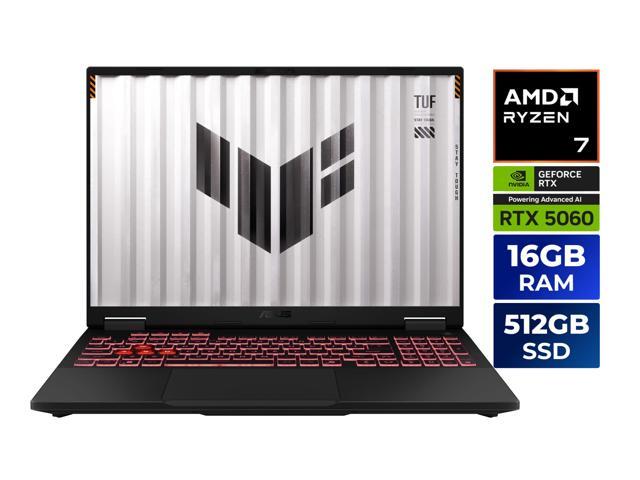
The ASUS TUF A16 exists to answer one question: what’s the best gaming laptop at an accessible starting point that doesn’t sacrifice build quality? The ROG Strix G16 and Zephyrus G16 are excellent, and they cost meaningfully more. The TUF A16 slots below them with the RTX 5060, a more utilitarian chassis, and a display that trades resolution for simplicity.
I’ve been using this as my dedicated gaming machine for several weeks. It handles everything I throw at it. It’s heavy enough that I leave it on my desk most days. That’s the honest trade-off: this is a home base gaming laptop. The Zephyrus is a travel gaming laptop. Once you accept that, the TUF A16 makes a lot of sense.
Gaming Performance
The AMD Ryzen 7 260 is a capable gaming CPU with good efficiency characteristics. Eight cores paired with AMD’s integrated RDNA 4 graphics gives you a fallback for light productivity tasks, and the RTX 5060 laptop GPU gets reasonable TGP headroom in performance mode to run closer to its ceiling.
| Game | Settings | FPS |
|---|---|---|
| Cyberpunk 2077 | FHD+, High, DLSS Quality | 80 fps |
| Fortnite | FHD+, Epic | 135 fps |
| Baldur’s Gate 3 | FHD+, High | 70 fps |
| CS2 | FHD+, High | 250+ fps |
| Elden Ring | FHD+, Maxed | 60 fps |
Sustained gaming performance holds up better than most laptops at this price. ASUS’s triple-fan TUF cooling system keeps the RTX 5060 near its boost clocks even after 45 minutes of Cyberpunk. I ran the same thermal stress on a budget gaming laptop from a competing brand and saw clock speeds drop more aggressively after 30 minutes. The TUF A16 thermals are a genuine selling point, not just marketing language.
DLSS 4 with Frame Generation is available in supported titles, and on a 165Hz panel it matters. Cyberpunk at 80 fps base becomes notably smoother with Frame Generation running.
Display
The 16” FHD+ (1920x1200) 165Hz IPS panel is the main area where the TUF A16 makes compromises. Compared to the QHD OLED panels on the Zephyrus G16 or the higher-resolution IPS on the ROG Strix G16, this screen looks noticeably lower-resolution. Text isn’t as crisp. Fine details in games lack the pixel density of 1440p panels.
That said, it’s not a bad display. 165Hz with a 3ms response time means motion is clean and competitive gaming feels responsive. Brightness lands around 300 nits, which is fine for indoor use. Color coverage hits roughly 100% sRGB, so casual content consumption looks good even if it’s not calibrated for creative work.
If you game primarily at high frame rates and aren’t doing color-critical creative work, FHD+ at 165Hz is entirely usable. If you’re doing photo editing or want to notice fine graphical detail in open-world games, you’ll wish for more pixels.
Thermals
This is where the TUF A16 earns its keep. ASUS designed this chassis with thermal performance as the priority. The triple-fan system moves more air than the slim gaming laptops in this category, and the result is consistent GPU clock speeds under sustained loads.
During extended gaming sessions, GPU temperatures stabilized around 80 degrees Celsius. CPU temps peaked around 95 degrees during simultaneous CPU+GPU stress, then settled. Fan noise in performance mode hits around 45dB measured at arm’s length. In balanced mode, which is what I use for normal gaming, it’s closer to 40dB.
The keyboard deck stays cool enough to use comfortably during gaming. The bottom panel gets warm but not uncomfortable. Airflow through the side vents is where most of the heat exits, so positioning the laptop on a hard, flat surface makes a real difference.
Build Quality and Portability
MIL-SPEC 810H certification means the TUF A16 passed drop, vibration, temperature, and humidity tests. It’s not indestructible, but the chassis has noticeably less flex than comparable laptops at this price point. The lid doesn’t wobble when you carry it one-handed. The keyboard deck has minimal give under typing pressure.
The keyboard itself has decent travel and per-key RGB via ASUS’s Aura Sync ecosystem. Dedicated Numpad takes up right-side space, which might bother some. Touchpad is large and precise.
Port selection includes two USB4 Type-C ports that support DisplayPort Alt Mode, two USB-A 3.2, HDMI 2.1, and an RJ-45 ethernet jack. No SD card slot is frustrating for anyone doing content work. The included USB4 ports handle external docking well.
At 5.5 lbs, this is not a travel laptop. It fits in a backpack and I’ve taken it to LAN parties, but I wouldn’t choose it over the Zephyrus G16 for weekly commuting. It’s a desk machine that can travel when needed.
Battery Life
The 90Wh battery combined with AMD’s power-efficient Ryzen 7 260 produces legitimately good battery life for a gaming laptop. In productivity use with the screen at moderate brightness and the discrete GPU disabled, I consistently hit 7 to 8 hours. That’s solid for a gaming laptop in this class.
Gaming on battery cuts that to about 1.5 to 2 hours, but the performance mode switches automatically when plugged in, so the experience is consistent when you’re at a desk.
The Bottom Line
The ASUS TUF A16 is the gaming laptop I recommend when someone asks what to buy and doesn’t want to spend top dollar. The RTX 5060 handles current games at FHD+ without breaking a sweat, thermals are a genuine strength, and the MIL-SPEC chassis feels better than the price suggests. The display resolution and base RAM are the concessions you make, and the weight means this lives on a desk rather than in a bag.
For the buyer who wants solid gaming performance, good build quality, and doesn’t need to carry it across a city every day, the TUF A16 is the most sensible entry point into RTX 5060 gaming in 2025.