Overview
I’ve spent time with both the ThinkBook 16 Gen 7 and its pricier ThinkPad siblings, and the value gap is striking. At this machine costs a bit less than the ThinkPad T14s Gen 6 and a bit less than the X1 Carbon. Yet it ships with a larger, sharper display and more ports than either of them. The tradeoff? Build quality and keyboard feel. They’re good here. Not ThinkPad-level great.
This is Lenovo’s laptop for small businesses, startups, and professionals who want solid hardware without enterprise pricing. It ships with Windows 11 Pro, a 1080p webcam with a privacy shutter, and a fingerprint reader. Everything I needed for daily work was included out of the box.
Performance
The Intel Core Ultra 5 235H handled my business workloads without breaking a sweat. Office 365, Teams video calls with screen sharing, Chrome with 20-plus tabs, light photo editing in Lightroom. All smooth. The NPU accelerates on-device AI features in Windows, including Copilot and Studio Effects for webcam enhancement.
The 16 GB LPDDR5x-6400 RAM is fine for standard business workflows, but it’s soldered to the motherboard. You cannot upgrade it. That’s the ThinkBook 16’s biggest limitation, and I want to be blunt about it. If you routinely run virtual machines, large datasets, or complex design files, you’ll want 32 GB. That means looking at more expensive models.
Storage is a single 512 GB PCIe 4.0 NVMe SSD. Read and write speeds are solid for the price tier, and there’s a second M.2 slot available for adding more storage later. If you store files primarily in OneDrive or Google Drive, 512 GB is fine. If you work with large local files, plan to add a second drive.
Display
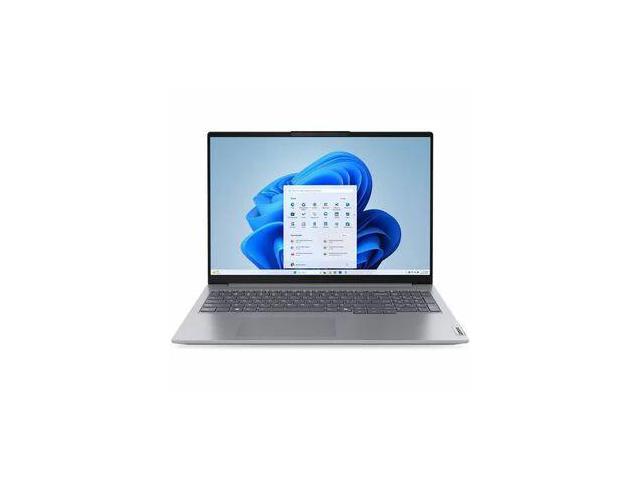
The 16-inch 2.5K (2560x1600) IPS display is the ThinkBook 16’s standout feature, and it’s the main reason I’d recommend it. At most competitors ship with 1080p panels. That makes this a real advantage. The 16:10 aspect ratio provides extra vertical space for documents and spreadsheets, and the 120Hz refresh rate makes scrolling feel noticeably smoother than the 60Hz business panels I’m used to.
Brightness peaks at approximately 350 nits, comfortable for indoor office environments. Color accuracy covers 100% sRGB and about 70% DCI-P3. It’s not a display for professional design work, but for presentations, documents, video calls, and web browsing, the image quality punched above its price for me.
The matte anti-glare coating cuts reflections effectively without making the screen look grainy. Combined with the 120Hz refresh rate and 2.5K resolution, everyday use feels crisp and pleasant. I kept going back to this display after testing pricier laptops, and it held up.
Build and Portability
The aluminum lid and polycarbonate base give the ThinkBook 16 a clean, professional look. The subtle ThinkBook logo is understated enough for any corporate environment while looking more modern than the classic ThinkPad aesthetic.
Build quality is good for the price. I tested the lid flex, and it resists well. The keyboard deck has a slight give when pressed firmly, but nothing alarming. The hinge supports one-finger opening. Overall, it feels more premium than should.
At 3.97 lbs, the ThinkBook 16 is heavier than the ThinkPad T14s (2.83 lbs) and the X1 Carbon (2.48 lbs), but those are 14-inch laptops. For a 16-inch machine, sub-4 lbs is reasonable. It fits in standard laptop bags and backpacks without issue.
The keyboard is a standard Lenovo chiclet layout with 1.5mm travel. I typed on it for full work days and found it comfortable. It’s significantly better than most budget business laptops. It’s not quite at ThinkPad level, missing the snappy tactile feedback of the T14s, but it’s well above average. The trackpad is large and responsive with Windows Precision drivers.
Battery life from the 71 Wh cell is strong. I got 8 to 10 hours of productivity use with the display at 50% brightness. The efficient Core Ultra 5 processor sips power during office workloads, and the 2.5K IPS panel is less demanding than OLED. The 65W USB-C charger is compact and charges to 80% in roughly an hour.
The Bottom Line
The ThinkBook 16 Gen 7 is the best business laptop in this price range for anyone who cares about screen quality and ports. The 2.5K 120Hz display outclasses everything else I’ve tested at this price, and the Core Ultra 5 processor handled my business workloads with room to spare. Just make sure 16 GB of soldered RAM is enough for your workflow before buying. If it is, this is remarkable value.