Why Your PC Needs a UPS
A power strip with surge protection stops voltage spikes. That’s it. It won’t help during a brownout, a blackout, or the kind of dirty power that slowly degrades your hardware over months. A UPS does three things a surge protector can’t: it provides battery backup during outages, regulates voltage during sags and swells, and gives you time for a clean shutdown instead of a hard crash.
I learned this the hard way. Lost a WD Black SN850X to a power outage mid-write. The drive survived, but the partition table didn’t. After that, every system I build gets a UPS.
The BR1500MS2 Setup
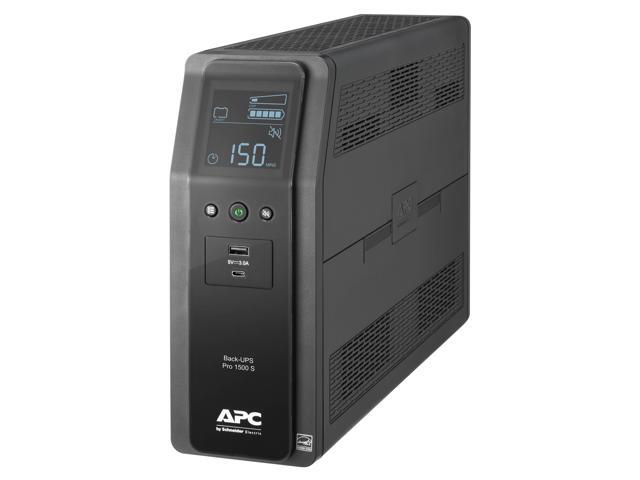
The APC Back-UPS Pro 1500VA sits under my desk powering a full gaming system: an Intel Core i9-14900K build with an RTX 5080, a Samsung Odyssey OLED G8, and a secondary 27-inch monitor. Total draw at the wall during gaming hovers around 550 to 650W. During normal desktop use, it’s closer to 200W.
Out of the box, setup is simple. Plug it in, let the battery charge for 8 hours, connect your gear. The rear panel has ten outlets split into two groups: six on battery backup plus surge protection, and four with surge protection only. I put the PC and main monitor on battery backup, and everything else (speakers, desk lamp, phone charger) on surge-only.
The front LCD panel is genuinely useful. It shows input voltage, estimated runtime, load percentage, and battery charge. No guesswork.
Voltage Regulation (AVR)
This is the feature that separates a UPS from a battery with outlets. The BR1500MS2 uses Automatic Voltage Regulation to correct input voltage between 82V and 144V without ever touching the battery.
In my house, wall voltage fluctuates between 115V and 124V on a normal day. During summer when every AC unit on the block kicks on, I’ve seen it dip to 108V. The UPS silently boosts that back to ~120V. The LCD shows the correction happening in real-time, and the system never notices a thing.
Before the UPS, my PC would occasionally reboot during heavy summer evenings. Turns out it wasn’t a PSU problem or a Windows issue. It was dirty power. The AVR fixed it completely.
Battery Runtime
Let’s be realistic about runtime. At full rated load (900W), you get roughly 3 minutes. That sounds terrible on paper. In practice, you’re rarely pulling 900W.
Here’s what I measured with my actual setup:
| Load Scenario | Wall Draw | Runtime |
|---|---|---|
| Idle desktop (both monitors on) | ~180W | 38 minutes |
| Web browsing, light work | ~220W | 30 minutes |
| Gaming (Cyberpunk 2077, RT Ultra) | ~620W | 6 minutes |
| Cinebench + Furmark stress test | ~780W | 4 minutes |
Six minutes during gaming is enough to save, quit, and shut down. Thirty minutes during light work means you can ride out most short outages without interrupting anything. The UPS beeps when it switches to battery, giving you an audible heads-up.
PowerChute, APC’s management software, can trigger an automatic graceful shutdown when battery drops below a threshold you set. I have mine configured to start shutdown at 25% battery. It’s saved me twice during extended outages when I wasn’t at my desk.
The Sine Wave Question
Here’s the honest trade-off. The BR1500MS2 outputs a stepped approximation to a sine wave when running on battery. Most modern PC power supplies, especially any 80 Plus rated PSU, handle this fine. Active PFC circuits in quality PSUs are designed to work with various waveforms.
But some hardware doesn’t like it. I noticed a faint buzz from my bookshelf speakers when the UPS switched to battery during a test. My NAS also threw a warning about power quality. For a gaming PC or office workstation, the stepped sine is a non-issue. For sensitive audio equipment, a NAS, or medical devices, you want a pure sine wave UPS like the APC SMT1500C Smart-UPS line.
Noise
The BR1500MS2 is not silent. During normal operation, the AVR transformer produces a low hum when it’s actively correcting voltage. In a room with any ambient noise (fans, AC, speakers playing), you won’t notice it. In a dead-silent room at 2 AM, you’ll hear it if you listen for it.
When the UPS switches to battery, there’s a relay click and a brief (half-second) transfer time. The beeping is loud. You can silence the alarm through PowerChute or the front panel button, but the default behavior is a persistent beep every 30 seconds while on battery. Fair warning.
The cooling fan inside the unit rarely spins up unless you’re pulling heavy load. During my normal usage patterns, I’ve only heard the fan during stress tests.
Build Quality and Longevity
This is a 24.5-pound brick. The chassis is thick plastic with a matte finish, and it feels solid. Nothing rattles. The outlets grip plugs firmly, which matters when you’re running heavy gauge cables to a gaming PC.
APC includes a 3-year warranty covering the battery, which is better than most competitors. The battery itself is a standard sealed lead-acid unit that you can replace yourself. APC sells replacements (APCRBC161), and third-party options exist too. Expect to replace the battery every 3 to 5 years depending on how many outages you cycle through and your ambient temperature.
I’ve been running mine for 14 months. Battery health still shows 100% in PowerChute. The unit has handled at least a dozen outages and countless voltage corrections without a single issue.
Who This Is For
The BR1500MS2 fits a specific use case perfectly: protecting a gaming PC or home office setup from power problems. If your total load stays under 700W (and most gaming PCs fall in this range unless you’re running a 5090), you’ll get meaningful battery runtime for graceful shutdowns.
Skip this if you need pure sine wave output, if your load exceeds 800W sustained, or if you’re protecting a server that needs rack mounting. For those situations, look at the APC Smart-UPS (SMT1500C) or the CyberPower PR1500LCD.
The Bottom Line
A year in, this UPS has earned its spot under my desk. The AVR alone justifies the purchase. Stable, corrected power delivery means fewer mysterious crashes, fewer file corruption events, and longer hardware life. The battery backup is the safety net you hope you never need, but when the lights go out mid-game or mid-save, you’ll be glad it’s there.
The stepped sine wave and the weight are real drawbacks, not dealbreakers. For the majority of PC setups, the BR1500MS2 does exactly what a UPS should do: sit there quietly, fix your power, and catch you when the grid fails.