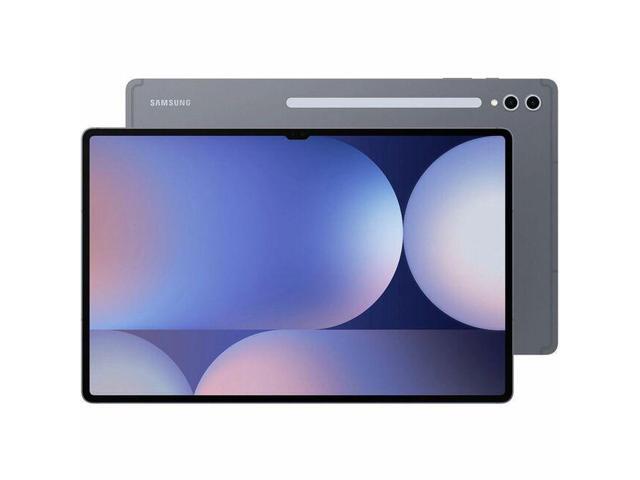
The Biggest Tablet You Can Buy (and Why That Matters)
I have a confession. Before the Galaxy Tab S10 Ultra, I thought tablets were consumption devices. Good for Netflix on the couch. Maybe some note-taking. Not real work machines.
Six weeks with the Tab S10 Ultra changed that. The 14.6-inch screen is large enough to run two full apps side by side without squinting. DeX mode with Samsung’s keyboard cover turned it into something I actually used instead of my laptop for a full work week. Not as an experiment. Because it was genuinely easier.
But size is a double-edged sword. This thing is bigger than a MacBook Air. You need to want a big tablet, not just tolerate one.
Display
The 14.6-inch Dynamic AMOLED 2X panel is the star of this tablet. 2960 x 1848 resolution at 120Hz with HDR10+ support. Colors are vivid without being oversaturated. Blacks are true black because AMOLED pixels turn off completely. Contrast is infinite in the way that only self-emissive displays can deliver.
I compared it directly to the Galaxy Tab S9 FE and the difference is stark. The S9 FE’s IPS LCD looks washed out and gray next to this panel. Night-mode reading, HDR content on Netflix, photo editing: the AMOLED display wins every single time.
The 120Hz refresh rate makes scrolling, pen input, and general navigation feel fluid and responsive. Going back to 60Hz after using this feels like dragging through mud. Even the S9 FE’s 90Hz panel feels slightly less smooth in direct comparison.
Outdoor visibility is excellent. Samsung’s peak brightness hits 930 nits, which handles direct sunlight better than any tablet I’ve tested. Anti-reflective coating on the screen helps too, cutting glare enough to work comfortably on a patio.
S Pen
The S Pen comes in the box, same as every Samsung tablet with the S-series naming. Latency is roughly 2.8ms according to Samsung, and in practice, it feels instantaneous. Strokes land exactly where the pen tip touches. No perceptible lag. No drift.
For digital art, the S Pen pressure sensitivity works beautifully in Clip Studio Paint, which I use for illustration work. 4,096 levels of pressure sensitivity means thin hairlines and thick bold strokes feel natural. Tilt detection lets you shade by angling the pen, which is intuitive once you get used to it.
For notes, Samsung Notes remains the best built-in note app on any platform. Handwriting-to-text conversion is accurate even with my terrible handwriting. Audio recording synced to handwritten notes is a killer feature for meetings: tap any word and the recording jumps to that moment. I use this constantly now.
The S Pen magnetically attaches to the back of the tablet and charges wirelessly. The magnet is strong, noticeably stronger than the Tab S9 FE’s side-mount. I carried it in a backpack for weeks without the pen falling off once.
Performance
The MediaTek Dimensity 9300+ is new territory for Samsung’s Ultra tablets, replacing the Snapdragon chips of previous generations. In daily use, it’s fast. Apps open instantly. Split-screen with three apps (Samsung Notes, Chrome with 20+ tabs, Slack) runs without a hitch.
Gaming performance is strong. Genshin Impact runs at high settings with stable 60fps. Call of Duty Mobile holds steady at max graphics. The Dimensity 9300+ has a big-core-only architecture (four Cortex-X4 cores, four A720 cores) that delivers bursts of power when needed.
The trade-off is heat. During extended gaming sessions (30+ minutes of Genshin Impact), the tablet gets noticeably warm on the back left side. Not hot enough to be uncomfortable, but warm enough that you notice. Samsung’s thermal throttling kicks in gracefully: performance drops slightly after 20 minutes of sustained load, but frame rates stayed playable.
For productivity workloads like document editing, browsing, video calls, and light photo editing in Lightroom, the Dimensity 9300+ never broke a sweat. This chip is overkill for normal tablet tasks. Where it earns its keep is multitasking: keeping six apps in memory and switching between them instantly.
DeX Mode: The Laptop Replacement Story
Samsung DeX mode transforms the tablet interface into a desktop layout with resizable floating windows, a taskbar, and a system tray. Pair it with Samsung’s Book Cover Keyboard (sold separately) and you get something that legitimately functions like a laptop.
I used DeX mode exclusively for one full work week. Email in Outlook, writing in Google Docs, Slack open in a side window, browser research in another. The 14.6-inch screen has enough real estate for two full-width windows side by side, or three narrower windows. The keyboard cover has a good key travel for a tablet accessory, better than Apple’s Magic Keyboard for iPad but not as good as a real ThinkPad keyboard.
Where DeX falls short: some Android apps don’t respect the windowed layout. Instagram opens in a phone-shaped column. Some banking apps refuse to resize. These are app developer problems, not Samsung problems, but they chip away at the laptop replacement promise. The core productivity apps (Office suite, Google Workspace, Slack, Zoom, browsers) all work perfectly.
File management in DeX is functional. Samsung’s My Files app handles local storage, Google Drive, OneDrive, and network shares. Drag and drop works between windows. It’s not macOS or Windows, but it’s closer than I expected.
Battery Life
The 11,200 mAh battery is massive. My typical day (2 hours of notes with S Pen, 3 hours of web browsing, 1 hour of Netflix, miscellaneous app use) left me at 30 to 40% by bedtime. On lighter days with just reading and browsing, I went two full days between charges.
Heavy use tells a different story. A full day of DeX mode with keyboard, Wi-Fi always on, and screen brightness at 70% drained the battery in about 9 hours. Gaming cut that to roughly 5 hours. Samsung’s claimed 16 hours is achievable with moderate use and adaptive brightness, but don’t expect it during a DeX work session.
45W charging is a noticeable upgrade over the Tab S9 FE’s 25W. Zero to full takes about 80 minutes. More importantly, a quick 30-minute charge gets you from dead to roughly 45%, which is enough for an afternoon of work.
Camera
Dual rear cameras: 13 MP main and 8 MP ultra-wide. Dual front cameras: 12 MP wide and 12 MP ultra-wide. The front cameras are the ones that matter on a tablet.
Video calls look sharp. The dual front camera system enables auto-framing that tracks multiple people in a group call, similar to what Apple does with Center Stage. The ultra-wide front camera keeps everyone in frame during team calls, which is handy for shared whiteboard sessions.
The rear cameras are fine. Better than the Tab S9 FE’s single 8 MP shooter. Good enough for document scans, whiteboard captures, and reference photos. Nobody should shoot vacation photos with a 14.6-inch tablet, but Samsung included decent sensors for the times you actually need them.
Who Should Buy This
Professionals who want a tablet that replaces a laptop for travel. DeX mode with the keyboard cover handles 80% of standard office work. The S Pen adds handwriting and annotation that laptops can’t match.
Digital artists and illustrators. The 14.6-inch AMOLED canvas with S Pen is the closest Android gets to a Wacom Cintiq experience at a fraction of the size and weight.
Students in fields that combine typed work and handwritten notes. Medical students sketching anatomy. Architecture students annotating plans. Law students who want split-screen case law and handwritten notes simultaneously.
Skip this if you want a compact, lightweight reading tablet (the Tab S9 FE is better for that). Skip this if your workflow demands Windows or macOS apps that don’t have Android equivalents. And skip this if you’re not prepared to carry something that weighs more than most 13-inch laptops.
The Bottom Line
The Galaxy Tab S10 Ultra is the best Android tablet ever made. That’s not hyperbole. The 14.6-inch AMOLED display is gorgeous. The S Pen is the best stylus on any tablet platform. DeX mode makes this a real productivity machine, not just a media consumption device. Battery life lasts a full day of actual work. IP68 rating means it survives real life.
The size is the only real question. If 14.6 inches sounds exciting, this is your tablet. If it sounds excessive, Samsung makes smaller versions. But after six weeks of living with the Ultra, I don’t want to go back to anything smaller for work. The screen real estate changes what a tablet can do.