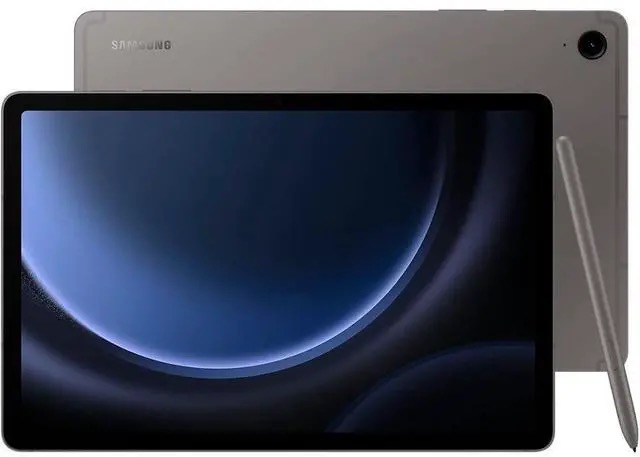
The Tablet That Does Enough
Most people don’t need the best tablet. They need a good one. One that takes notes with a stylus that doesn’t feel like scratching glass with a crayon. One that streams Netflix without dying halfway through a flight. One that survives a coffee spill without a funeral.
The Samsung Galaxy Tab S9 FE is Samsung’s answer to that pitch. I’ve been using one for three months as my primary tablet. Not alongside a flagship. Instead of one.
Display
The 10.9-inch IPS LCD runs at 2304 x 1440 resolution with a 90Hz refresh rate. Text is crisp. Scrolling is smooth. Colors are accurate enough for reading, streaming, and note-taking without any complaint.
Where it falls short is contrast. Black backgrounds glow gray in a dark room. If you’re used to an OLED phone or the flagship Tab S9’s AMOLED panel, you’ll notice the difference immediately during dark scenes in movies or when using dark mode at night. In daylight and normal indoor lighting, the LCD holds its own. The backlight gets bright enough for outdoor use in shade, though direct sunlight washes it out like any LCD.
The 90Hz refresh rate is the sweet spot. 60Hz feels sluggish once you’ve experienced higher refresh rates. 120Hz is nice but eats battery. 90Hz splits the difference and keeps everything feeling responsive without the power penalty.
S Pen
The S Pen comes in the box. Not sold separately for an absurd upcharge. Not an optional accessory. In the box. This matters because the S Pen is half the reason to buy this tablet.
Latency is low enough that handwriting feels natural. Not quite Apple Pencil levels of responsiveness, but close enough that my hand adapted within a few minutes. The pen tip has a slight friction against the LCD that mimics paper better than the glassy feel of writing on the flagship AMOLED models. Some people actually prefer this texture.
Samsung Notes is the default app and it’s genuinely capable. Handwriting recognition converts my messy scrawl into searchable text. PDF annotation works well. I’ve taken meeting notes, sketched interface mockups, and marked up documents without reaching for a third-party app.
The S Pen magnetically attaches to the side of the tablet for charging and storage. The magnet is strong enough to hold during normal handling but will pop off inside a bag. A case with a pen holder fixes this.
Performance
The Exynos 1380 is a competent mid-range chip. Apps launch quickly. Multitasking with split-screen (Samsung’s DeX mode handles this well) runs smoothly with two apps side by side. Switching between Samsung Notes, a browser with a dozen tabs, and a streaming app produces no noticeable lag.
Gaming is where the chip shows its limits. Casual games run fine. Graphically intense titles like Genshin Impact need settings turned down to medium for a stable frame rate. If gaming is your primary tablet use case, this isn’t your tablet.
For productivity, browsing, streaming, and note-taking? The Exynos 1380 never made me wait. Three months of daily use and I can count the number of stutters on one hand.
Battery Life
Samsung claims 18 hours. My experience lined up with that for mixed use: notes in the morning, some browsing at lunch, streaming for an hour or two in the evening. I charged every other day with moderate use. During a cross-country flight with continuous video playback and airplane mode, I landed with over 40% remaining after five hours.
The 8,000 mAh cell is large. The 25W charger takes about 90 minutes from dead to full, which isn’t fast by phone standards but is reasonable for a battery this size. I plugged in overnight and never thought about it.
IP68: The Underrated Feature
This tablet is IP68 rated. That means submersion in 1.5 meters of fresh water for 30 minutes. In practice, it means I used it in the kitchen without flinching when sauce splattered. I read on the patio during a drizzle. My kid grabbed it with wet hands and I didn’t lunge across the room.
Most tablets in this category have no water resistance rating at all. IP68 on a mid-range tablet is a genuine differentiator that matters more in daily life than benchmark numbers.
Camera
The 8 MP rear camera takes adequate photos in good light. Document scanning, whiteboard capture, quick reference shots. That’s about the ceiling. Low light is grainy. Video is passable.
The 12 MP front camera is better and more useful. Video calls through the front camera look sharp with decent color. Samsung’s auto-framing feature (similar to what Logitech does with the Brio 500) tracks your face and keeps you centered during calls.
Nobody should buy a tablet for its cameras. But for the things you actually use tablet cameras for, the Tab S9 FE gets the job done.
Software and Updates
Android 14 with Samsung’s One UI 6.1 runs the show. Samsung promises four major OS upgrades and five years of security patches, which means this tablet will receive Android 18 and stay secure through 2029. That’s a commitment that matches Apple’s iPad support window and destroys what most Android manufacturers offer.
DeX mode turns the tablet into a desktop-like interface when connected to a keyboard. Split-screen multitasking supports up to three apps simultaneously. Samsung’s ecosystem features (Quick Share, phone link, clipboard sync) work well if you carry a Samsung phone. If you don’t, those features still work but with more friction.
Bloatware exists. Samsung includes its own apps alongside Google’s, plus a few carrier and partner apps. You can disable most of them. After 10 minutes of cleanup, the home screen was mine.
Who Should Buy This
Students who need a note-taking device with a stylus that doesn’t require a separate purchase. The S Pen and Samsung Notes combo is the best stylus note-taking experience on Android.
Anyone who wants a couch and travel streaming tablet with a battery that lasts a full weekend of casual use. The 10.9-inch screen hits the sweet spot between portable and watchable.
People who are hard on their devices. The IP68 rating means this tablet survives real life, not just a careful desk existence.
Skip this if you want the best display for HDR content (get the OLED flagship), if you game heavily on your tablet (you need a faster chip), or if you’re deep in the Apple ecosystem (an iPad will integrate better with your other devices).
The Bottom Line
Three months of daily use and the Galaxy Tab S9 FE earned a permanent spot in my bag. The S Pen is good enough that I stopped carrying a notebook. The battery outlasts my patience for using it. The IP68 rating removed the anxiety of using a tablet like an actual portable device instead of a precious artifact.
The LCD panel and Exynos chip are the trade-offs, and they’re the right ones. For every task except gaming and watching HDR movies in the dark, this tablet performs identically to models that cost significantly more. The four years of OS updates mean it won’t become a paperweight next year.
If you want a tablet that does the real work (notes, reading, streaming, browsing, video calls) and survives the real world (water, dust, bags, kids), the Tab S9 FE is the one to get.