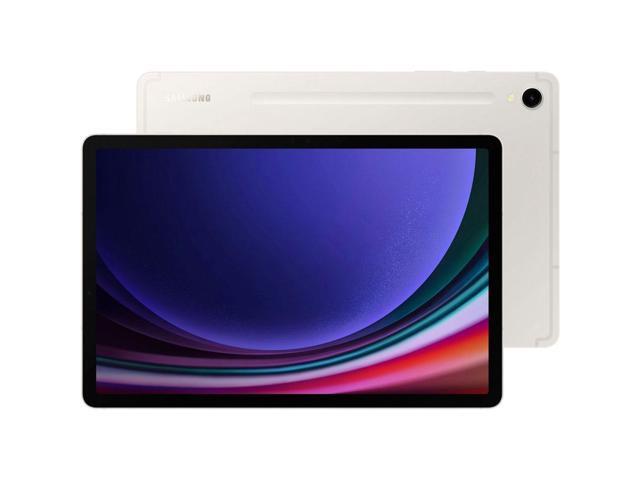
The Tablet That Gets the Balance Right
There’s a version of the Android tablet story that goes: buy the biggest screen you can afford. More real estate. More multitasking. More everything.
I spent two months disagreeing with that.
The Samsung Galaxy Tab S9 has an 11-inch screen. Not 12.4. Not 14.6. Eleven inches, which is large enough to be a productive work surface and small enough to fit in a backpack sleeve without needing a dedicated compartment. Light enough to hold with one hand for a reading session. Powerful enough that I stopped thinking about performance and just used it.
It’s the Goldilocks tablet in Samsung’s S9 lineup. Not the entry-level compromise of the S9 FE. Not the “this is a commitment” scale of the S10 Ultra. The Tab S9 is the one I keep reaching for.
Display
The 11-inch Dynamic AMOLED 2X panel runs at 2560 x 1600 resolution with a 120Hz refresh rate. Comparing it directly to the Tab S9 FE’s IPS LCD tells you everything you need to know about OLED versus LCD in one glance.
Dark scenes in movies look different in a fundamental way. OLED pixels turn off completely for true blacks. The S9 FE’s LCD glows gray in those same scenes. Once you see true black on a tablet display, you can’t unsee the gray glow of LCD. For movies, dark UI themes, and night-mode reading, this matters every session.
Colors are vivid without crossing into oversaturation. Samsung defaults to a “Vivid” mode that punches contrast and saturation. I prefer “Natural” for extended reading because it’s easier on the eyes. Both look excellent. Neither looks wrong.
The 120Hz refresh rate makes scrolling feel like a different activity than on 60Hz panels. Smooth, immediate, no judder. It also makes S Pen input feel more responsive than it actually is because your eye perceives the stroke landing in real time. Going back to 60Hz after two months felt like someone had smeared the screen.
Peak brightness hits 930 nits under Samsung’s adaptive display mode. Outdoor use in bright shade works without straining to see the content. Direct sunlight washes it out eventually, but this panel holds up better than most competitors.
Performance
Snapdragon 8 Gen 2 is the same chip that powered flagship Android phones in 2023. On a tablet with better thermal headroom than a phone chassis, it runs everything without a hint of strain.
Switching between Samsung Notes, Chrome with 15 open tabs, Slack, and Spotify feels instantaneous. There’s no pause while apps reload from memory. The 8GB RAM variant keeps six or seven apps in memory comfortably. The 12GB version takes multitasking further, but for standard workloads I never needed it.
Gaming performance is the clearest contrast with the Tab S9 FE. Genshin Impact at max settings runs at a stable 60fps. The S9 FE needs settings dialed back to medium for the same frame rate. Call of Duty Mobile, PUBG, Diablo Immortal: all run at maximum quality without thermal throttling in the first 30 minutes. After extended sessions, the tablet warms on the back but never becomes uncomfortable to hold.
The Snapdragon 8 Gen 2’s sustained performance is the real differentiator. Most flagship chips boost hard then throttle down. The 8 Gen 2’s efficiency architecture delivers consistent clock speeds through longer workloads. For tasks like video editing in CapCut, 4K export runs in roughly the same time at the start and end of a session.
S Pen
The S Pen comes in the box. Samsung includes it with every S-series tablet, and it remains the best reason to buy into the Galaxy Tab ecosystem over competing Android tablets.
Latency in Samsung Notes measures around 2.8ms according to Samsung’s documentation. In practice, strokes feel simultaneous with pen movement. No perceptible lag on handwriting. No jitter on diagonal strokes. The slight texture of the AMOLED panel creates enough friction to feel like writing on paper, not dragging a plastic tip across glass.
Pressure sensitivity (4,096 levels) translates accurately in Clip Studio Paint, Procreate Pocket, and Sketchbook. Thin hairlines and thick brush strokes come from pressure alone. Tilt detection enables natural shading by angling the pen. For casual sketching and professional illustration alike, the experience is excellent.
Samsung Notes is the standout app. Meeting recordings sync to handwritten notes by timestamp. Tap any word and the audio jumps to that moment in the recording. Handwriting recognition is accurate enough to search through months of handwritten notes by keyword. PDF annotation works without a third-party app. I stopped downloading other note apps within the first week.
The S Pen magnetically attaches to the back of the tablet for charging and storage. The magnet is strong. Two months of carrying it in a bag with the pen attached produced zero dropped styluses.
Battery Life
Samsung rates the 8,400 mAh battery at up to 12 hours. My mixed-use day (two hours of S Pen notes, 90 minutes of YouTube, two hours of browsing, Spotify running in the background) consistently left 30 to 40% by bedtime. Light reading and note-taking days stretched past the 12-hour claim.
The Snapdragon 8 Gen 2 is less efficient than MediaTek’s Dimensity 9300+ in the Tab S10 Ultra at sustained loads. Gaming for two hours drops the battery faster on the Tab S9. For productivity and media consumption, the difference doesn’t show up in daily use.
45W charging fills the 8,400 mAh battery from zero in about 75 minutes. A 30-minute charge buys roughly 45%, enough to handle an afternoon of work. The 15W wireless charging is a convenience feature for overnight charging rather than a speed solution, but it means any Qi pad works as a charger.
Size and Portability
498 grams. That’s the weight. The Tab S10 Ultra weighs 718 grams. The Tab S9 FE weighs 523 grams. The Tab S9 undercuts both while delivering more performance than the S9 FE and a more usable form factor than the S10 Ultra for travel.
The 5.9mm thickness is genuinely thin. In a sleeve inside a backpack, you forget it’s there until you need it. Holding it one-handed for bed reading or video calls doesn’t require adjusting your grip every 10 minutes.
The trade-off is screen real estate for multitasking. Samsung’s split-screen mode runs two apps side by side on 11 inches, but both windows feel cramped compared to the 14.6-inch canvas of the S10 Ultra. For a single-app workflow or two apps where only one needs full attention, the 11-inch size is fine. For running three apps simultaneously, the S10 Ultra’s size earns its weight.
Software
Android 13 with One UI 5.1, with Samsung’s commitment to four major OS upgrades and five years of security patches. This tablet will receive Android 17 and stay secure through 2028. That’s a meaningful support window for a device you expect to use for three to four years.
Samsung’s software additions are mostly useful. DeX mode runs a windowed desktop interface on the 11-inch screen, functional but tight. The Samsung Galaxy ecosystem integration syncs clipboard content, notifications, and apps with Samsung phones seamlessly. Quick Share handles file transfers faster than AirDrop in my testing. Bixby remains optional; I left it off.
Bloatware is the usual Samsung package: carrier apps, Samsung services duplicating Google services, a handful of partner apps. 15 minutes of disabling what you don’t want and the software experience is clean. After cleanup, I ran out of reasons to complain.
Who Should Buy This
The Tab S9 is the right tablet for people who want OLED quality, flagship performance, and an included stylus in a size that fits in a bag without redesigning how you pack.
Students who note-take heavily. The S Pen experience in Samsung Notes on an AMOLED panel is the best handwriting setup on Android. The size is right for lecture hall desks and library tables.
Professionals who want a travel companion that supplements a laptop rather than replacing it. The Tab S9 handles email, documents, notes, and video calls. For anything requiring a full desktop OS, bring the laptop. For everything else, this tablet covers it.
Artists and illustrators who want a quality drawing surface without the weight commitment of the S10 Ultra. The 11-inch canvas is large enough for serious work. The S Pen’s pressure sensitivity and latency rival dedicated drawing tablets at several times the cost.
Skip the Tab S9 if you want the largest possible screen and are willing to carry the weight (get the Tab S10 Ultra). Skip it if you want maximum battery life on a budget (the Tab S9 FE outlasts this on lighter workloads). Skip it if you need full Windows software compatibility (no Android tablet solves that).
The Bottom Line
Two months of daily use and the Galaxy Tab S9 earned a spot as my preferred recommendation in the Samsung tablet lineup. Not the cheapest. Not the biggest. The best balance.
The AMOLED display puts the S9 FE’s LCD behind it the moment you see both side by side. Snapdragon 8 Gen 2 handles everything without compromise. The S Pen lands in the box, not as an upcharge. IP68 means you stop treating it like a fragile artifact. And 498 grams means you carry it without resenting the weight.
If you want a tablet that handles the real work and fits in real life, this is it.